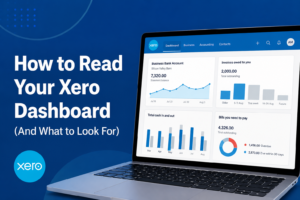
For many business owners, the Xero dashboard is the first thing they see each morning. But instead of simply checking your bank balance, your dashboard can provide valuable insights into your cash flow, profitability, outstanding invoices, and upcoming financial obligations. Understanding what these numbers mean can help you make better business decisions and stay in control of your finances.
1. Start with Your Bank Account Balances
Your bank account summary gives you a real-time snapshot of the cash currently available in your business accounts. This should be your first checkpoint each time you log in.
What to look for:
- Is your cash balance increasing or decreasing?
- Do you have enough funds to cover upcoming expenses?
- Are all bank transactions being reconciled regularly?
Consistently reviewing your bank balances helps you avoid cash flow surprises and identify potential issues early.
2. Monitor Cash Flow Trends
The Cash In and Cash Out section shows how money is moving through your business over time.
What to look for:
- Is more money coming in than going out?
- Are expenses growing faster than revenue?
- Are there seasonal fluctuations affecting your cash position?
Healthy businesses focus on cash flow, not just profit. A profitable business can still face challenges if cash isn’t arriving on time.
3. Keep an Eye on Invoices Owed to You
Outstanding invoices represent money your customers owe your business.
What to look for:
- Overdue invoices that need follow-up.
- Customers with recurring late payments.
- Growing accounts receivable balances.
The longer an invoice remains unpaid, the greater the impact on your cash flow. Regular monitoring helps improve collections and reduce bad debt risk.
4. Review Bills You Need to Pay
The Bills to Pay section shows upcoming and overdue supplier payments.
What to look for:
- Bills approaching their due dates.
- Overdue supplier payments.
- Large upcoming expenses that could impact cash flow.
Staying ahead of supplier payments helps maintain strong business relationships and avoids unnecessary late fees.
5. Check Your Profit Position
Many Xero dashboards now include profit and loss insights, giving you a quick overview of business performance.
What to look for:
- Revenue trends compared to previous periods.
- Increasing operating costs.
- Whether your business is generating sustainable profits.
A rising revenue figure is positive, but it should be supported by healthy profit margins.
6. Pay Attention to Alerts and Tasks
Xero highlights important actions that require attention, including unreconciled transactions, overdue invoices, and outstanding bills.
What to look for:
- Bank accounts requiring reconciliation.
- Overdue customer invoices.
- Supplier bills needing approval or payment.
These alerts act as your financial to-do list and help ensure nothing slips through the cracks.
Common Mistakes Business Owners Make
Many business owners only check their bank balance and ignore the rest of the dashboard. This can lead to:
- Missed overdue invoices.
- Poor cash flow forecasting.
- Unpaid supplier bills.
- Delayed financial decision-making.
Your dashboard provides a complete picture of your business—not just how much cash is currently in the bank.